3ds Max 2025–2027 • Corona 15–16+ • V-Ray 7+

Render farm manager for
3ds Max studios

Submit and monitor every render job across your office workstations and remote PCs, from your desk or your phone.

One-time purchase (no subscription) • Built-in 3-day free trial (up to 5 PCs) • Zero per-artist fees • Windows 10/11 & Android
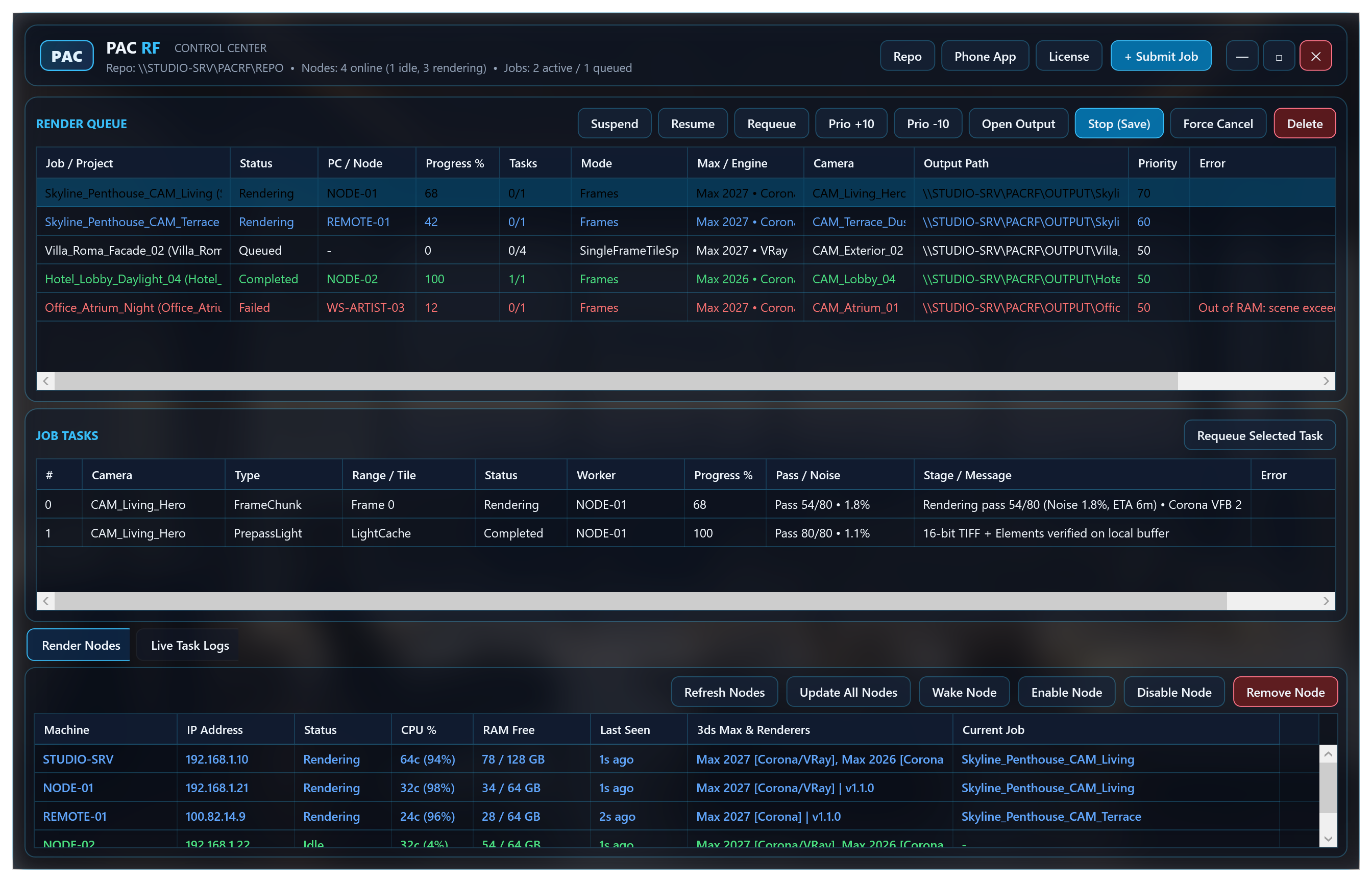
PAC RF Control Center — Render Queue, Job Tasks & Live Nodes
PAC RF Control Center Windows application showing live render queue, job tasks, and studio render nodes
3ds Max
2025, 2026 & 2027
Renderers
Corona 15–16+ & V-Ray 7+
Render Modes
Frames, Tile Split & Native DR
Access
Windows, Android & iOS Web
Submit and monitor

Submit from 3ds Max. See everything.

Start in the scene you are already lighting, catch mistakes before the queue picks them up, and save finished 16-bit TIFFs straight into the right project folder.

Four buttons right inside 3ds Max

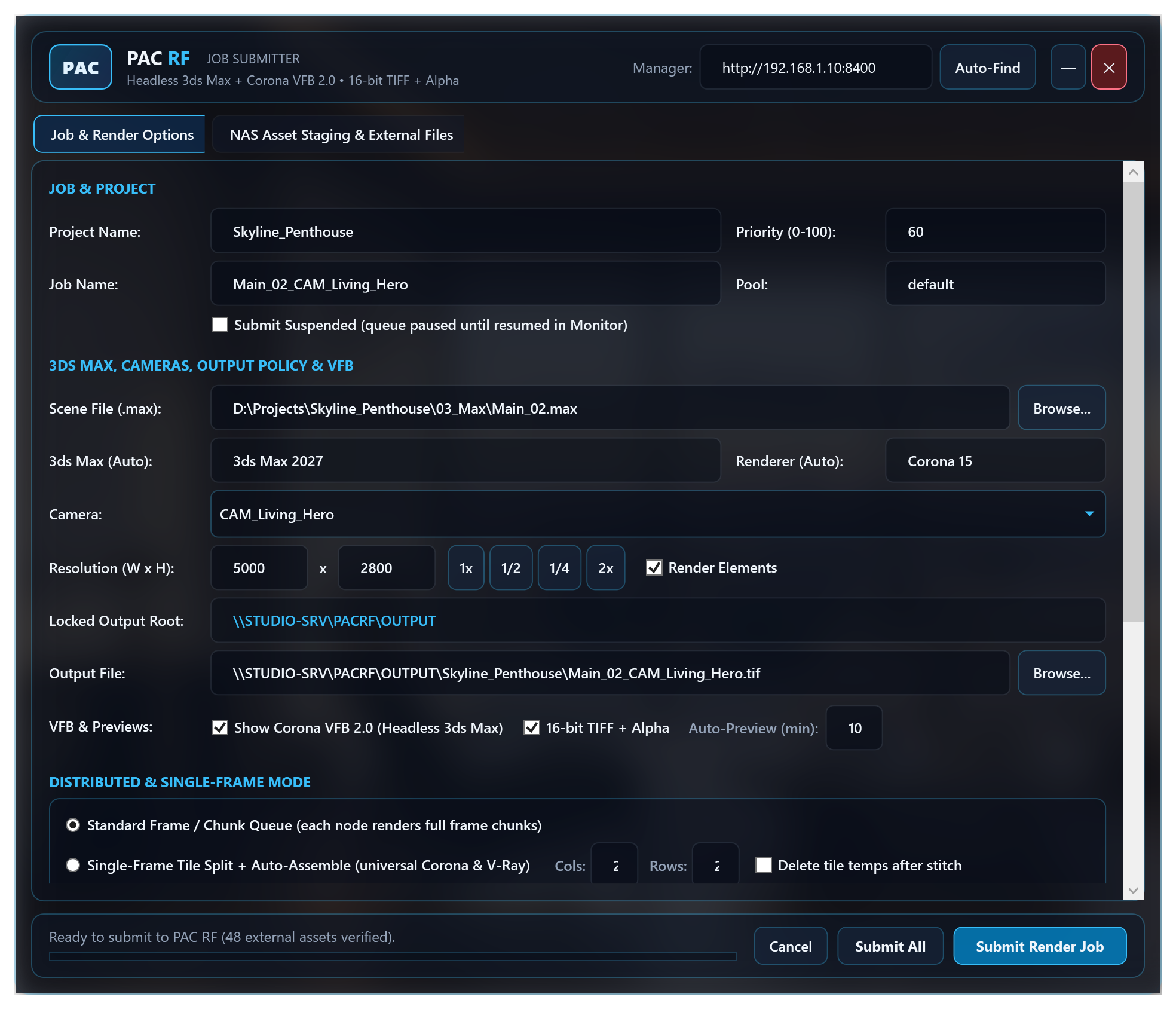
Launch jobs straight from the docked PAC RF toolbar without leaving your viewport, or open the standalone Submitter on any workstation.

3ds Max Toolbar RF ALL MONITOR DR
  • No scene changes. Packaging external bitmaps, HDRIs, IES profiles, proxies, and LUTs runs on a staged copy so your open scene and Recent Documents stay untouched.
  • Resolution presets. Test lighting at 1/2 or 1/4 of the saved width and height, double to 2x, or snap back to 1x in a single click.
  • Single or all cameras. Send the active camera via RF, enqueue every camera in the scene with Submit All, or click ALL to auto-fix and submit in one step.
  • Direct DR from your desk. Click DR inside 3ds Max to reserve idle farm nodes as Corona DRServer or V-Ray Spawner slaves for live workstation renders.
PAC RF 3ds Max Job Submitter window showing resolution presets, camera selection, and locked output path
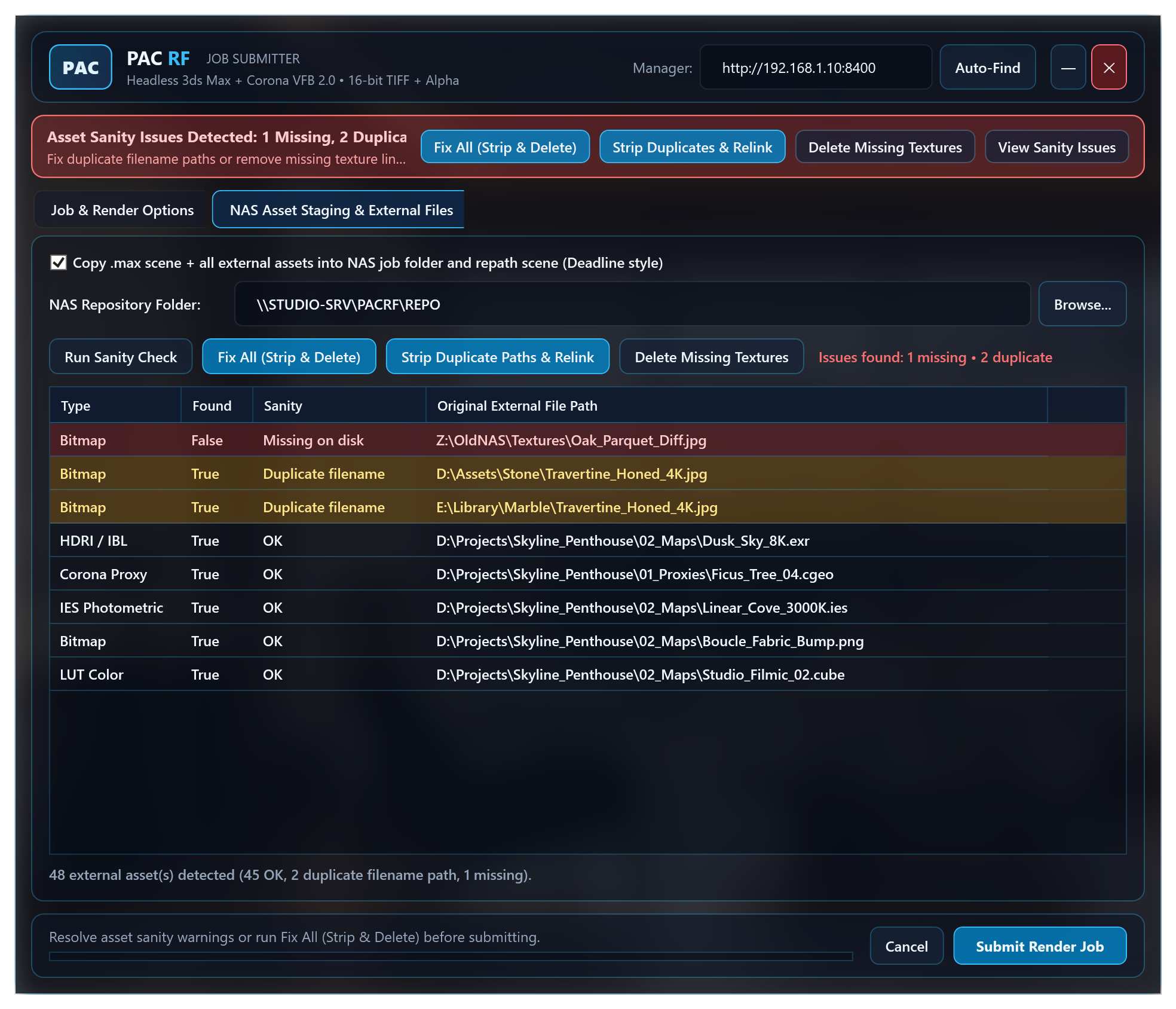
PAC RF Submitter NAS Asset Staging and External Files sanity check highlighting missing and duplicate paths

Catch scene mistakes before they render

Scenes don't fail silently at 2 AM anymore. Before a job hits the queue, Submitter checks the render state and every external asset referenced in the file.

  • Render Selected guard. If Corona or 3ds Max still has Render Selected switched on, Submitter stops and asks whether to turn it off cleanly or keep it enabled on purpose.
  • Missing & duplicate textures. Unreachable files are highlighted in red and duplicate texture filenames in amber, with one-click actions to strip duplicate paths, relink, or remove dead links.
  • Automatic project routing. Point Setup to your studio's Projects root once. PAC RF reads the project name from the .max path and writes finals to OUTPUT\<ProjectName>\ automatically.

Live render progress & Stop (Save)

Follow every frame directly from Control Center or your phone, see pass count and noise targets updating in real time, and pull a clean output early whenever a frame looks ready.

Pass 54/80 Noise 1.8% ETA 6m 16-bit TIFF + Alpha
  • Stop (Save) cleanly. Triggers Corona VFB 2.0 stop without killing the frame, saving your image and render elements intact.
  • 14-day local failsafe. Nodes finish writing locally before transferring to the shared Output share, keeping a 14-day recovery copy if the NAS drops.

Artist-friendly error logs

When 3ds Max exits with a raw Windows code or renderer fault, PAC RF reads the tail log and surfaces a plain-English explanation right inside Control Center and push alerts.

Raw: 3dsmaxbatch.exe exited with code -1073741801 (std::bad_alloc) Out of RAM: scene exceeded available memory on this PC. Lower displacement/proxies or assign to a higher-RAM node.
Raw: Could not obtain a license (Chaos Unified Login) Renderer license error: Corona/V-Ray license is signed out or unreachable on this node. Open Chaos Unified Login on the node desktop.
Farm management

Your whole farm in one view.

Control Center connects automatically on launch with no IP hunting. Inspect every job, per-task progress, hardware load, and installed 3ds Max versions in real time.

Include & exclude per job.

Move machines between Included and Excluded lists right in the Submitter when a heavy scene needs high-RAM nodes or an artist's workstation is busy.

Wake-on-LAN & clean node lists.

Wake sleeping offline machines directly from Control Center, remove stale workstations from the grid, and restore any online node with one click on Refresh Nodes.

Frames, Tile Split & Native DR.

Queue frame chunks across machines, split single still frames into N×M regions stitched cleanly in Q16 HDRI, or coordinate Corona & V-Ray DR nodes cleanly.

Boot-ready services & OTA updates.

Manager and Worker Windows services start on boot while the Desktop Session Broker launches headless 3ds Max inside the signed-in session so Chaos & Autodesk licenses stay valid. Push updates across every node with Update All Nodes.

Mobile & remote

Step away from your desk. Stay in control.

The bundled Android app (PACRF-Mobile.apk) and iPhone/iPad web dashboard pair by QR code in seconds and connect from studio Wi-Fi or anywhere over 4G/5G with no limits.

PAC RF Android App — Live Queue, Progressive VFB Preview & Action Confirmation
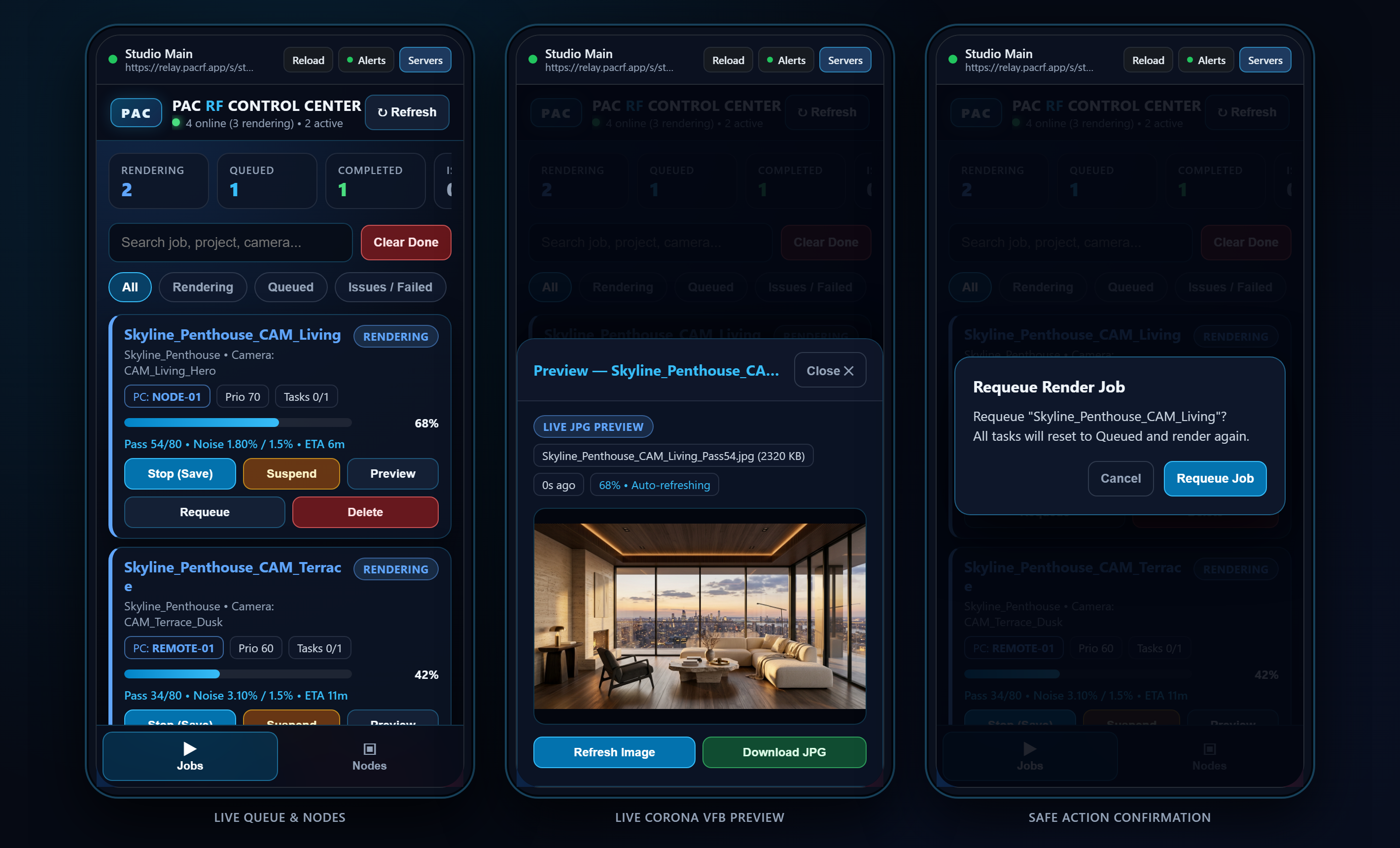
Three screens of the PAC RF Android app showing live render queue, progressive preview, and requeue confirmation prompt

Connect everywhere with no limits.

Turn on remote access from Control Center's Phone App dialog. Uses Always-On Cloud Relay and automatic URL recovery across Manager reboots.

Live previews & push alerts.

Inspect progressive JPG previews on your phone, download full-resolution JPGs, and get native alerts when jobs start, finish, fail, or a node stalls.

Safe confirmation guards.

Accidental taps won't kill an overnight render: Android and the mobile web UI ask for confirmation before suspending, requeuing, or deleting jobs and saved servers.

For the whole studio

Built for everyone on the team.

Artists, studio leads, and whoever sets up the machines each get what they need from the same lightweight suite.

Submit straight from 3ds Max.

Use the docked RF, ALL, MONITOR, and DR buttons without saving over your scene or cluttering Recent Documents.

No accidental Render Selected.

Pre-submit checks catch forgotten Render Selected flags, missing maps, and duplicate texture filenames before nodes touch the file.

Watch progress, Stop & Save.

Track Corona/V-Ray pass count, noise %, ETA, and progressive VFB frames from your workstation or Android phone.

Automatic project folders.

Every submission automatically resolves the project name from your Projects directory and lands inside OUTPUT\<ProjectName>\.

Fast deployment

From installer to first render in minutes.

One encrypted Windows installer sets up the Manager PC or joins additional Worker nodes over LAN or VPN, with built-in ? tooltips on every folder choice.

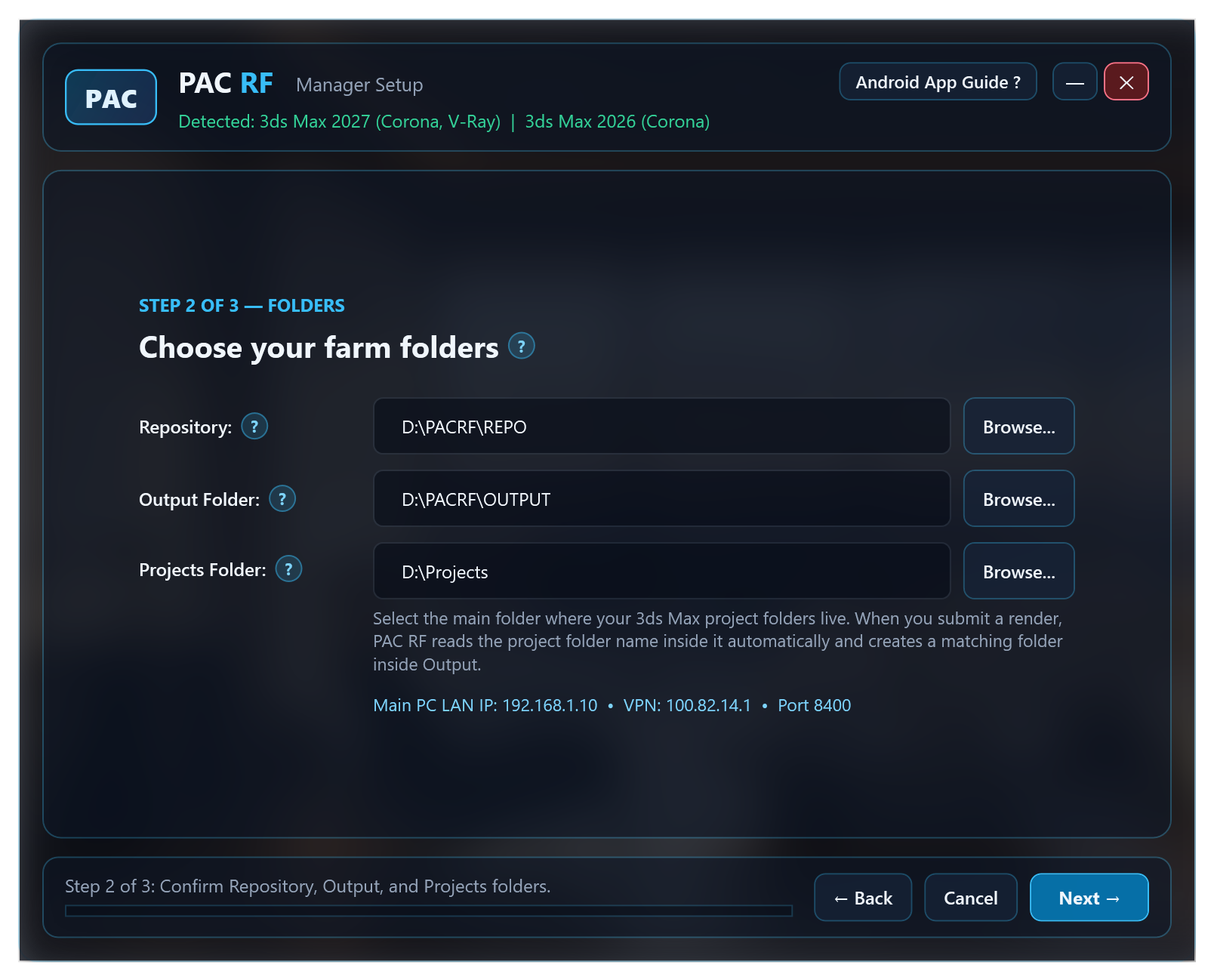
PAC RF Setup Wizard Step 2 Folders with hover help badges

Clear guidance during install

Hover any ? badge to see plain advice on picking Repository, Output, and Projects folders, or open the 4-step Android pairing guide right in the header.

  • One encrypted package. Bundles Manager, Worker, Control Center, Submitter, 3ds Max 2025–2027 plugin, and PACRF-Mobile.apk.
  • LAN & VPN staging. Auto-finds the Manager over UDP port 8401 on LAN or transfers staged scenes over HTTP for remote VPN nodes.
  • Zero per-artist setup. 3ds Max startup scripts auto-register toolbars and menus for every artist account on the machine.
  • Silent fleet rollout. Deploy across studio nodes from the command line using /silent and /projects= flags.
One-time license • No subscription

Buy once. Own it forever.

No monthly or annual subscriptions, and zero per-artist fees. Install Submitter, Control Center, and the Android app on every artist workstation at no extra cost—only active render nodes count.

One-time payment • No recurring fees
Indie & Small Studio

Starter

€20 one-time
One-time purchase • Offline ECDSA key

For solo visualization artists and small studios rendering on up to 5 PCs.

  • Up to 5 render nodes (LAN & remote)
  • Unlimited Submitter, Control Center & Android seats
  • Auto-Project folder routing & Render Selected guard
  • Live VFB previews, push alerts & Web Dashboard
  • 14-day local output failsafe + email support
Buy Starter — €20
Scale & Render Racks

Enterprise

€99 one-time
One-time purchase • Unlimited render nodes

Flat-rate perpetual studio licensing for larger farms, render racks, and multi-site pipelines.

  • Unlimited render nodes & artist seats
  • Silent CLI deployment (/silent, /projects=)
  • Offline air-gapped ECDSA P-256 activation
  • Direct onboarding assistance
  • Priority direct support channel
Buy Enterprise — €99

One-time software purchase with no recurring subscriptions. Every tier includes a built-in 3-day free trial (up to 5 render nodes, no credit card). License keys permanently unlock the software offline with ECDSA P-256 hardware binding. Questions or licensing: pacstore2023@gmail.com.

FAQ

Frequently asked questions

Which 3ds Max and renderer versions are supported?
PAC RF supports Autodesk 3ds Max 2025, 2026, and 2027 on Windows 10/11 (x64) with Chaos Corona 15–16+ and V-Ray 7+. During installation and worker registration, each machine reports its detected 3ds Max and renderer versions automatically so jobs only route to compatible nodes.
How does the Android app connect when I'm outside the office?
Open Control Center and click Phone App. Switch on Remote Access, install PACRF-Mobile.apk on your phone, and scan the Android Pair QR code. PAC RF connects over local studio Wi-Fi automatically when in the office and uses Always-On Cloud Relay with automatic URL recovery when you are away—no manual port forwarding needed.
Do I pay per artist seat, or only per render machine?
Only active render nodes count toward your tier limit (5, 15, or Unlimited). You can install the 3ds Max Submitter, Control Center, and Android companion app on every artist computer and phone at zero extra charge.
How does automatic Project folder detection work?
During Setup, choose your studio's main Projects directory (on a local drive, NAS share, OneDrive, or Dropbox). Whenever an artist submits a scene from inside that directory, PAC RF extracts the project folder name automatically and saves outputs into OUTPUT\<ProjectName>\.
Do nodes come back online after a Windows reboot, and do Chaos / Autodesk licenses still work?
Yes. Both Manager and Worker install as auto-start Windows Services. On signed-in desktops, PAC RF's Desktop Session Broker launches headless 3dsmaxbatch.exe inside the active Windows user session so Chaos Unified Login and Autodesk Desktop Licensing stay signed in and Corona VFB 2.0 stays accessible.
Does PAC RF work offline without internet access on render nodes?
Yes. Studio licenses use offline ECDSA P-256 hardware-bound keys validated locally on your Manager PC. Only enabling optional outside-office Cloud Relay phone access requires an internet connection from the Manager.
Try PAC RF on your own studio machines

One encrypted Windows installer includes Manager, Worker, Control Center, 3ds Max Submitter Plugin, and the Android app—with a built-in 3-day free trial for up to 5 render PCs.